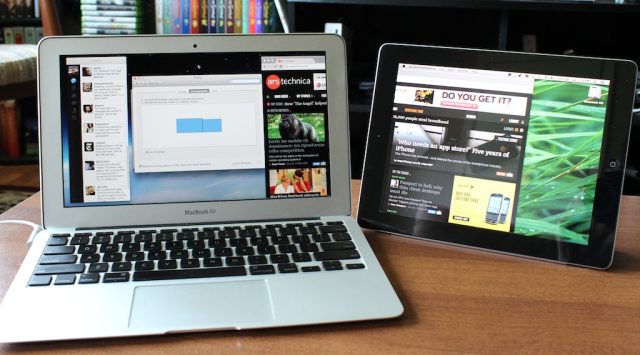
Splashtop's XDisplay is one of several apps that will let you use your iPad as a second display.
Andrew Cunningham
For all the talk about a “post-PC” world, most people use smartphones or tablets as an addition to their existing technological arsenal, rather than a replacement for a standard laptop or desktop. In fact, there are a number of ways to combine the capabilities of your PC and mobile device that can make your tablet or smartphone an even more powerful tool. In this article, the first in a series, we'll take a look at ways to use your computers and mobile devices in tandem to get more out of each of them.
Multi-monitor setups are becoming increasingly common on desks in homes and workplaces, and as a multi-monitor user I can say that I've developed quite a few habits and workflows that rely on that second monitor being there. I normally use one display as my primary workspace—mostly used for writing, researching, and general Web browsing—and the second display for things I like to be aware of at a glance, but don't actively need every minute of every day—things like e-mail, Twitter, and IRC. While I'm traveling, I miss the convenience and flexibility of that second screen.
We've seen a number of solutions intended to resolve this problem—USB-powered monitors like this one from AOC seem the most practical, and we've also seen laptops with second screens built in or with bizarre ultra-wide displays—but if you already have a tablet, there are a few apps that can get you your second monitor without much additional cash outlay. The one we'll be talking about today is Splashtop's XDisplay.
Read 6 remaining paragraphs | Comments
DIGITAL JUICE


No comments:
Post a Comment
Thank's!