Thursday, November 1, 2012

Quick Tip: Create a “Scary” Text Effect in Photoshop

Quick Tip: Create a “Scary” Text Effect in Photoshop:
In this quick tip tutorial, we will show you how to create a "scary" text effect using layer styles in Photoshop. Let’s get started!


Tutorial Assets


The following assets were used during the production of this tutorial.


Step 1


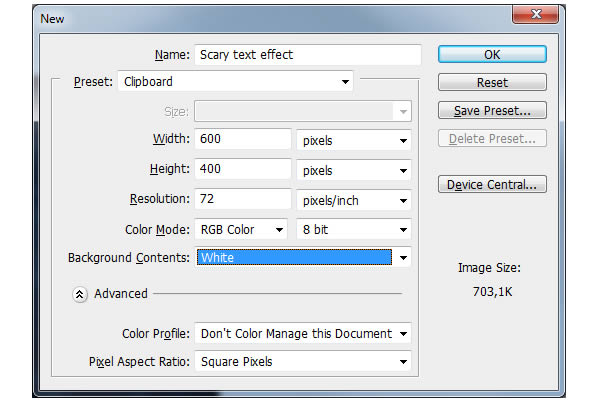
First create a new .PSD document, 600 x 400 pixels in RGB mode, 72 DPI with WHITE background color. Now prepare your assets. Install the Times New Yorker font into your computer and open the .PAT file.


Step 2


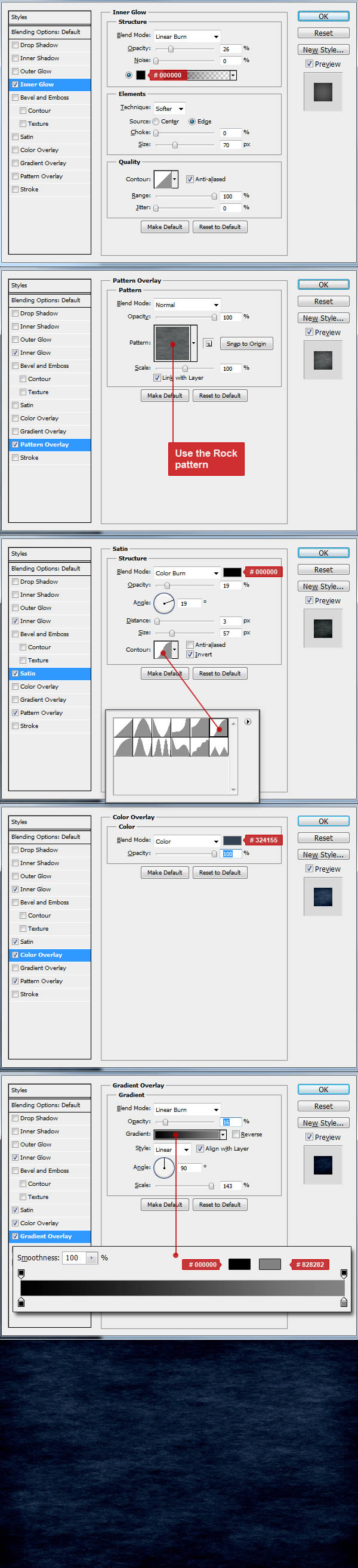
First, we need to make a layer from background. To do this, right click on Background layer and choose "Layer from background" name it as you wish and hit OK. Now go to Menu > Layer > Layer Style > Blending Options and use the settings below. You can also access Blending Options with two faster ways. First and the fastest way is to double click on the layer in your layers menu. Other way is to right click on the layer in your layers menu and choose Blending Options. When you are done with all the settings below, don’t forget to hit "OK" in the Blending Options window.


Step 3


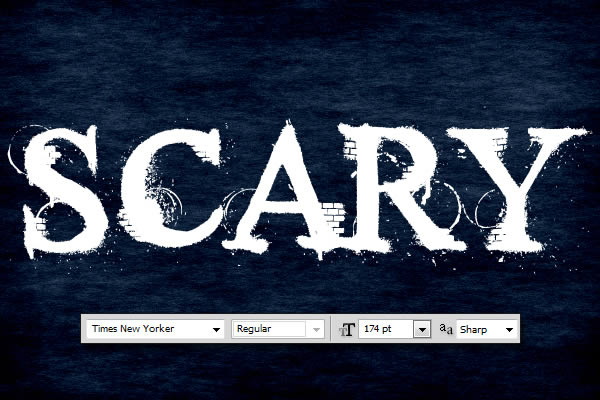
Now we can start making our text effect. First choose a type tool and change font to Times New Yorker, size around 174 pt and anti-aliasing Sharp. Now type your text somewhere in the center of the image. You can write any word, but in this tutorial I’ll use "SCARY". All letters uppercase.


Step 4


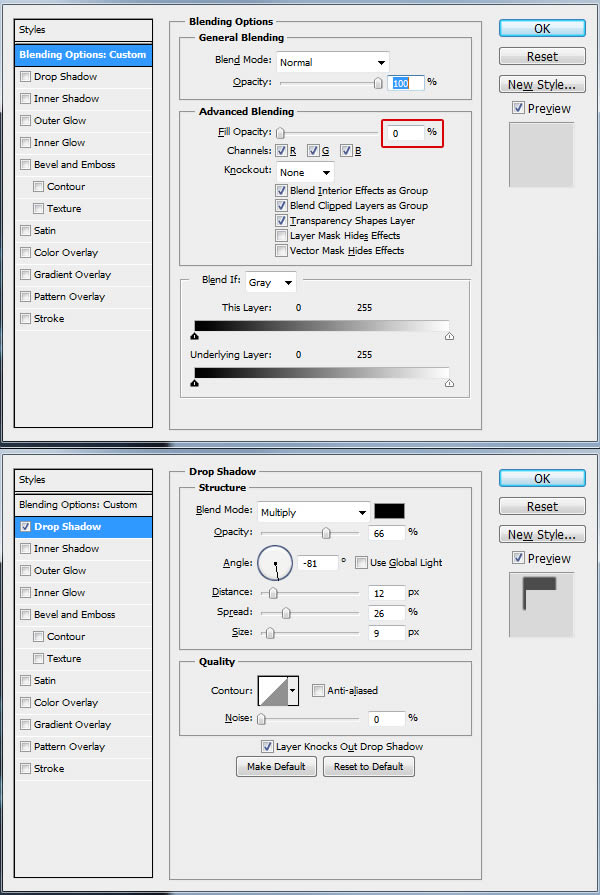
Go to Menu > Layer > Layer Style > Blending Options and use the settings below on your text. You can also use the quicker methods to access Blending Options from "Step 2" of this tutorial. When you are done with all the settings below, don’t forget to hit "OK" in the Blending Options window! This is the main text layer and will do most of the effects.



Step 5


Now duplicate your text layer by selecting the text layer in layer menu and going to Menu > Layer > Duplicate layer and name it as you wish. Now go to Menu > Layer > Layer Style > Clear Layer Style as we will make different style for this layer. Finally, go to Menu > Layer > Layer Style > Blending Options and use the settings below on your text. You can also use the quicker methods to access Blending Options from "Step 2" of this tutorial. When you are done with all the settings below, don’t forget to hit "OK" in the Blending Options window! This text layer will be above the 1st text layer in your layer menu. It will just add the dark shadow to the final result.


Final Image



DIGITAL JUICE

How To Embed Images In InDesign So They Don't Go Missing - Video Tutorial

How To Embed Images In InDesign So They Don't Go Missing - Video Tutorial: In this week’s InDesign Secrets episode, Anne-Marie Concepción addresses the dreaded lost image phenomenon, which occurs when Adobe InDesign can’t find your linked images and lets you know with glaring red question marks. The presence of glaring red question marks in your actual layout (and not just your Links panel) is courtesy of InDesign CS6, but the lost images phenomenon is familiar to users of earlier versions of InDesign as well. READ MORE...

(posted by Jennifer Apple for www.PhotoshopSupport.com)

DIGITAL JUICE

Windows 8 And Adobe Photoshop Operating System Compatibility Chart

Windows 8 And Adobe Photoshop Operating System Compatibility Chart: You can find an Adobe product operating system compatibility chart that will show you exactly which Adobe products work with Windows 8 and which don't. The information details the compatibility of the most recently released version of each Adobe product with Microsoft Windows 8. The chart will be updated as new information becomes available. READ MORE...

(posted by Jennifer Apple for www.PhotoshopSupport.com)

DIGITAL JUICE

Toning Black and White Photographs - Lightroom 4 Video Tutorial

Toning Black and White Photographs - Lightroom 4 Video Tutorial: In this episode of The Complete Picture (Toning Black and White Photographs in Lightroom 4 ), Julieanne Kost explains the best way to add a color tone to an image using the Split Tone and Tone Curve panels as well as demonstrates how to save presets to increase your productivity. Although this video was recorded in Lightroom, the same techniques are available in Adobe Camera Raw in Photoshop CS6. Click to download the Toning presets for Lightroom 4 (JKost_Toning.zip) and Photoshop CS6 (PS_JKost Toning.zip). READ MORE...

(posted by Jennifer Apple for www.PhotoshopSupport.com)

DIGITAL JUICE

The Comic Book Illustrations of Alex Garner

The Comic Book Illustrations of Alex Garner:
Alex Garner is a veteran comic book illustrator and concept artist who has worked on projects for Upper Deck, Konami, Electronic Arts, Bandai, Marvel Comics, DC Comics, Blizzard Entertainment, Hasbro, and various others. He has illustrated several iconic comic book characters such as Wonder Woman, Green Lantern, and more. In this article, we will take a look at a few of our favorite works from his portfolio.


ImagineFX Cover


Green Lantern Corps No.2 Remix


Wonder Woman No. 614


Gotham City Sirens


Wonder Woman No. 613


Wonder Woman No. 610


Wonder Woman No. 609


Wonder Woman No. 606


Annihilators No. 1


Green Arrow No. 6


Wonder Woman No. 602


Wonder Woman No. 601


GeNext: United 4


Skaar: Son of Hulk 10


DIGITAL JUICE

A Guide to Guides (Part 2)

A Guide to Guides (Part 2):
In this two-part tutorial, Martin will teach you what you need to know about using Guides and Rulers in Photoshop. This tutorial, Part 2, will show you how to create bleeds and crop marks using guides in Photoshop. Let’s get started!


DIGITAL JUICE

What You Need to Know About JPEG Files

What You Need to Know About JPEG Files:
JPEG files are one of the most popular image formats but you might be surprised what you don’t know about them. In this episode, we will show you some tips and tricks about saving information into JPEG files. Let’s get started!


DIGITAL JUICE

Wednesday, October 31, 2012

Announcing the new Windows Phone 8 Developer Platform

Announcing the new Windows Phone 8 Developer Platform:

I’m proud to launch the Windows Phone 8 Developer Platform. After years of planning and development, today we’re making available the most important advancement of our dev plat to date, including a new SDK and a refreshed Dev Center now open for Windows Phone 8 app submissions.

Here at the //BUILD 2012 conference, developers are seeing firsthand how we’re delivering close alignment with Windows 8 via a common core. Moving to a common Windows core meant that almost every major underlying subsystem had to change. For example, for the .NET Framework, we moved from using .NET CF to Core CLR, two different versions of the Framework that forked from each other over five years ago. This gives developers far more capability. Our colleagues in the Developer Division have two new blog posts that go into more details on new tools and .NET enhancements.

This investment, in turn, allows developers to take advantage of support for native C++ programming, familiar tools, and common APIs to target phones, PCs, and tablets for an estimated combined opportunity of roughly 500 million units next year.

image

New home: A refreshed Windows Phone Dev Center rolled out Tuesday

The phone market alone represents a tremendous opportunity. Competition is strong, but people are ready for a phone built around them. With a new Start screen, more customizable Live Tiles, and the innovative new features like Rooms and Kid’s Corner all revealed in yesterday’s launch, Windows Phone 8 is the world’s most personal smartphone. Early industry and customer response has been fantastic, and Windows Phone will be available through 50 of the top mobile operators worldwide starting next month. The expansion of phone hardware options and Windows Phone Store to 191 markets equates to a 90 percent increase in addressable market for your apps in 2012.

And, of course, there’s the developer opportunity. Frankly, this was the easy part: we just delivered what you asked for. You told us you wanted native code, in-app-purchase, and more ways to reuse and port code—done, done, and done.  More than 90 percent of the things you asked for, we added. These capabilities combined with new phone features like better Live Tiles, Lenses, NFC support, and custom app notifications and wallpaper on the lock screen mean that apps do more—and do it in more markets—on Windows Phone.

Today is about giving you what you need to immediately start taking advantage of this opportunity, including dev devices from our friends at Nokia for those attending //BUILD. We wouldn’t be here without the patience, feedback, and support of our dev community and great partners (including the 30-plus announced today) —thank you.

I hope you’ll take this opportunity to learn about the new platform and its capabilities by installing the new SDK. If you’ve already got an app, now is the time to start doing things like adding large tile support (to take advantage of the extra Start screen real estate and show more info on the tile) and experimenting with native code.

vs

New tools: Using the new Windows Phone 8.0 SDK

Visit the Dev Center for guidance on how to get started with the new SDK and to locate a Developer Camp in your area where you can get one-on-one hands-on time with our experts. You can also check out the //BUILD conference technical session recordings on Channel 9 and watch this blog for more posts from my team providing guidance and additional details on the new platform.

Windows Phone 8 is out, the tools are available, and devices are about to be released—it’s time to get coding. As an added incentive, for the next 8 days individual developers can register for a Dev Center account for just $8 (a 92 percent savings). Please note because this is a very limited time offer. You’ll be charged $99 USD or equivalent in your local currency, and we’ll refund the difference in the next 30 to 45 days. Watch for more details on Dev Center soon.

There’s never been a better time to be a developer for Windows Phone. As the lead for the developer experience, I’d love to hear your questions and feedback here or at #wpdev.

Kevin


DIGITAL JUICE

New tools for Windows Phone 8 save developers time and money

New tools for Windows Phone 8 save developers time and money:
The Windows Phone developer ecosystem is enriched every day by companies, communities, and people who are creating offerings and resources to help developers quickly and easily build or port great apps for Windows Phone. Over the past year, we’ve started collecting these offerings, and we’ve created a list of Windows Phone Developer partner resources, in which we identify commercial and open-source resources in the following categories:

  • Tools: Development environments, utilities, frameworks, and libraries to help you build, generate, and debug apps during the development process.

  • UI components: UI elements like list controls, button, charting, and other visual components,

  • Web API: Cloud-based services like notification, mapping, back-end processing, ad networks, and leaderboard services that developers can consume through a web API.


ThirtyPlusPartnersWe’ve seen strong response to these offers, so we’re focusing even more attention in this area for Windows Phone 8. We’re thrilled to highlight today more than 30 commercial and open-source offerings by companies and organizations that have jumped on board.
On the open-source front, we engaged with communities early in the process so they could add Windows Phone 8 support in popular tools and frameworks. Read the details.
Let’s take a closer look at the partners who are announcing today their support for Windows Phone 8 at the //BUILD conference.
Native gaming
One significant feature of the Windows Phone 8 development platform is support for the native C++ programming model. Native code offers a number of benefits related to code reuse, and it opens up opportunities for game engines, physics, animation, audio libraries, and more. The following organizations are announcing Windows Phone 8 support:

Tools, cross-platform frameworks, HTML5, libraries, and UI
We’re seeing growing support for Windows Phone 8 among cross-platform tools, frameworks, and libraries vendors. Many of them take advantage of extensive support for HTML5 in Internet Explorer 10. Here’s what’s new:

On the C#/XAML development side, partners and communities have been getting ready. Here are the early birds who are supporting Windows Phone 8:

  • MVVM Light Toolkit gets a fresh new version that supports Windows Phone 8. Read the details on Laurent Bugnion’s blog.

  • Telerik today released a new version of its RadControls, with new, unique controls for Windows Phone 8.  //Build attendees can visit Telerik on the Expo floor.

  • Infragistics now includes Windows Phone 8 support with its NetAdvantage offering. //Build attendees can visit Infragistics on the Expo floor

  • XAML Spy, the visual runtime inspector debugging tool from First Floor Software, adds support for Windows Phone 8 today.

  • Xamarin releases Xamarin.Mobile, a single API developers can use for common device services like contacts, camera, and geolocation, with Windows 8 and Windows Phone 8 support. //Build attendees can visit Xamarin on the Expo floor


Web API, back ends as a service, cloud services
Cloud-based service providers are essential for developers to be able to expand app capabilities, connect users and scale, promote and monetize, analyze usage, and track issues. Today at //Build, we’re presenting the partners who are aligning with Windows Phone 8 in this area.

bsquareFinally, Bsquare, a Microsoft Gold Certified partner that specializes in providing engineering services and production-ready software products for the smart device market, launched today a porting service publishers can use to port existing apps from various platforms to Windows 8 or Windows Phone 8 quickly and affordably, with prices starting at $10,000 (USD).
Welcome, everybody, to the Windows Phone 8 developer ecosystem!
Here’s a snapshot of today’s partner announcements:
WPDevEcosystem
If you want to suggest a resource, feel free to contact me on Twitter @jccim, include the hashtag #wpdevecosystem with a description and link.


DIGITAL JUICE

Video: Mapping Tech Uses Flu to Show Why HIV Vaccine is Taking So Long

Video: Mapping Tech Uses Flu to Show Why HIV Vaccine is Taking So Long: Microsoft Research explores mutations of HIV in an attempt to help create a vaccine.

DIGITAL JUICE

Free Library Converts 2D Image to 3D

Free Library Converts 2D Image to 3D: Microsoft researchers, working with a colleague from the University of Illinois at Urbana-Champaign, have developed a library of code that converts a 2-D video or still image into a 3-D depth image.

DIGITAL JUICE

Theorem Proof Gains Acclaim

Theorem Proof Gains Acclaim: Georges Gonthier of Microsoft Research Cambridge, working with colleagues from Inria, recently delivered a computer-assisted proof of the Feit-Thompson Theorem, which when first published 50 years ago, took two volumes and 255 pages to contain it.

DIGITAL JUICE

What Comes After the Touch Screen?

What Comes After the Touch Screen?: Gesture control, devices that recognize different people, and tricks to make a screen feel as if it has physical buttons could be coming to your gadgets.

DIGITAL JUICE

Dancing Chairs and 3-D Puppets Will Make Kids Love the Kinect

Dancing Chairs and 3-D Puppets Will Make Kids Love the Kinect: KinEtre, a 3-D animator from Microsoft Research, lets you control virtual objects on a screen with your body.

DIGITAL JUICE