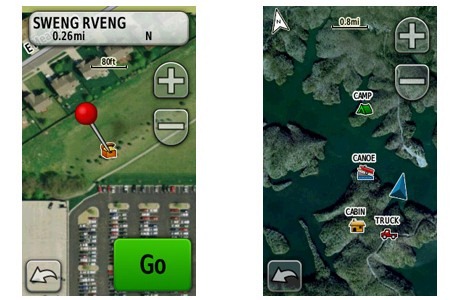
 Note to regular readers: This isn’t particularly "newsy," but I wanted to put together a resource page about BirdsEye that I could link to from reviews of compatible units. If you have comments about your experience with BirdsEye, etc., please add them below to help other folks who are considering ponying up for it. This intro will self-destruct in a few days!
Garmin BirdsEye Satellite Imagery is a $29.99 annual subscription plan that allows you to transfer satellite imagery to compatible Garmin devices. At this point, the following series are compatible:
- Astro 320
- Colorado series
- Dakota series
- Edge 800
- eTrex 20 and 30
- GPSMAP 62 series
- GPSMAP 78 series
- Montana series
- Oregon series
- Rino 6xx series
Is BirdsEye right for you?
IMHO, BirdsEye is most helpful for folks using it in urban/suburban areas (geocachers), other open landscapes (parts of the western US), and on lakes and rivers. I find it less useful in my area, under the dense canopy of the Southern Appalachians.
Things to know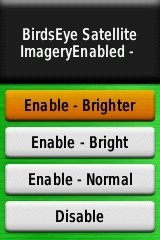
- BirdsEye imagery is downloaded and transferred to your device using Garmin’s free BaseCamp program
- These are large files and downloads can be slow, especially at peak times (like the start of the weekend)
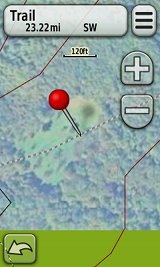
- If you have vector maps loaded, some features such as roads and contour lines will show as an overlay on top of the BirdsEye imagery (seen above, at right)
- BirdsEye subscriptions are sold on a per device basis; imagery cannot be transferred to another unit
- Imagery can be loaded to internal memory or a micro-SD card
- You can try BirdsEye imagery out before buying a subscription
- Imagery downloaded to your device or a micro-SD card does not expire if your subscription lapses
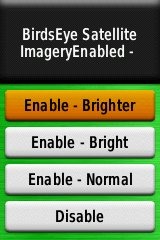
- You can adjust the brightness level (see screenshot above at right); on my 62s this is found under Setup > Map > Map Information/Select Map > BirdsEye Satellite Imagery
- A new product, BirdsEye Topo US and Canada, will let you put USGS and NRC topos on your device
Sound off!
Your turn, readers. What has your experience been with BirdsEye? How do you use it? Is it helpful? What have I left out?
No comments:
Post a Comment
Thank's!